How to Simplify School Staffing with a Vendor Management System (VMS)

School staffing is more complex than ever. Between tracking credentials, managing daily substitutions, and reconciling invoices from dozens of different agencies, administrators are overwhelmed. The paperwork is piling up, costs are difficult to track, and valuable time is lost.
To regain control, school districts across the country are increasingly turning to a reliable solution: a Vendor Management System (VMS). By moving away from scattered spreadsheets and manual staffing phone calls, schools are using VMS platforms to reclaim their time, reduce costs, and focus on what matters most: supporting students.
VMS 101: What is it and how does it work?
A Vendor Management System (VMS) is a single, centralized software platform that helps schools attract, hire, and manage their contingent workforce. Instead of juggling different systems for different agencies, a VMS tracks all your staffing and vendor relationships in one easy-to-use dashboard.
Core functions of a robust VMS
Role-Based Dashboards
Every user, from vendor to program manager, sees a custom dashboard highlighting exactly what needs their immediate attention (such as pending timesheets, expiring credentials, or new candidate submissions).
Substitute & Absence Management
Quickly distribute open positions or shift needs to your approved vendor pool. The
system handles the notifications, limiting the back-and-forth scramble if a staff member calls out.
Strict Data Isolation
A secure VMS operates on a 1-to-1 data process. Vendors cannot see other vendors’ candidates or rates, and your district’s data remains entirely isolated and protected.
Advanced GPS & Time Tracking
GPS-enabled time tracking helps verify that staff are at their assigned school location when clocking in and out.
Workers can also record breaks, helping schools meet state labor compliance requirements. The system additionally tracks staff travel mileage for accurate reimbursement and reporting.
Customizable Invoicing
Consolidate invoices from multiple different vendors into one streamlined billing process.
Depending on the district’s preference, invoices can be grouped by individual worker, by department, or by a specific school.
Compliance & Credential Tracking
Automatically screen vendors and staff, ensuring certifications (like CPR cards or SPED licenses) and background checks are up to date.
The system sends automated alerts 30-60 days before credentials expire so action can be taken proactively.
Understanding the Difference: VMS vs. MSP
VMS (Vendor Management System)
The actual software platform used to manage your vendors, timekeeping, analytics, and invoices. The cost for the software itself is typically very small – often a fraction of a percent of your total staffing spend.


MSP (Managed Service Provider)
A service you can hire. An MSP is a team of third-party staffing experts who help source vendors and run the VMS software on your school’s behalf for a management fee. They provide workforce solutions to optimize and simplify your staffing process.
If your district does not have the internal administrative staff to run the software or doesn’t wish to do so, an MSP takes over the day-to-day work: creating job openings, verifying credentials, communicating with agencies, and negotiating rates, so you don’t have to. The best outcomes usually occur when intuitive VMS technology is paired with the human support of an MSP.
3 VMS Benefits for Your School
A VMS has many different benefits designed for schools of any size, but these three consistently stand out to school administrators.

Step 1.
Reduced Administrative Burden
Tracking vendors, invoices, and credentials manually means searching for information across different spreadsheets, various emails, and physical folders. When auditing a worker, administrators often have to hunt down several different individual compliance documents.
From a single dashboard, schools get real-time visibility into their entire contingent workforce. Administrators can review a candidate, verify credentials, and click to approve a placement. Furthermore, a top-tier VMS allows districts to bulk-export all of a worker’s credentials and attachments into a single, organized PDF file with one click, drastically reducing audit preparation time.
Step 2.
Simplified Contracts & Invoicing
Schools often work with multiple vendors. Managing separate contracts, rate sheets, and invoices from 20 different agencies quickly becomes overwhelming, leading to payroll errors and overspending.
A VMS centralizes all vendor agreements. It allows districts to set up specific “Position Templates” with pre-approved minimum and maximum bill rates. When it’s time for payroll, the VMS takes all approved timesheets for the week, applies any negotiated discounts or fees, and consolidates them into one single, accurate PDF invoice for the district to pay.


Step 3.
Quality Control & Performance Tracking
Without centralized data, it is incredibly difficult for a district to know which staffing agencies are actually delivering quality candidates, or to track how well contracted staff are performing in the classroom.
A VMS tracks vendor performance metrics (like fill rates and time-to-first-submission) so you know exactly who your best partners are. Additionally, advanced VMS platforms feature built-in evaluation tools, automatically sending surveys (like SurveyMonkey integrations) to hiring managers at the end of a semester to evaluate the quality of the contracted staff.
How to Choose a VMS: Look for These 5 Features
A VMS should be easy to adopt and integrate into your school, with no technological background or expertise needed. When choosing a VMS, look for these features to make implementation a breeze:

Built from scratch for schools: Many vendor management systems are just acquired healthcare or corporate platforms that have been retrofitted. Look for a VMS built from the ground up based on direct feedback from educational clients. It should inherently understand school-specific staffing, bell schedules, and educational credentials.

Clean, easy-to-use UI: The platform should feature a clean user interface that clearly indicates where the user needs to take action the moment they log in.

In-depth reporting and analytics: You should have instant access to analytics regarding your “time-to-fill,” “fill rate by location,” estimated budget impacts, and granular shift-detail reports so you know exactly what is driving your costs.

Seamless integrations: Adopting a VMS should never interrupt established workflows. The best platforms integrate directly with major recruiting tools, allowing agency recruiters to submit candidates seamlessly without having to learn a completely new system.

Flexibility and vendor competition: Your VMS should give you the ability to work with different staffing agencies simultaneously. A VMS allows you to distribute an open position to several vendors at once, driving fair competition and ensuring you get the best candidate at the best rate, because you’re not locked into a single agency.
Steps and Timeline of VMS Implementation
You said yes to a VMS for your school. Now what? The VMS team will guide you throughout the entire implementation process. This typically takes about 12 weeks and happens gradually to ensure minimal disruption. Here’s what you can expect.
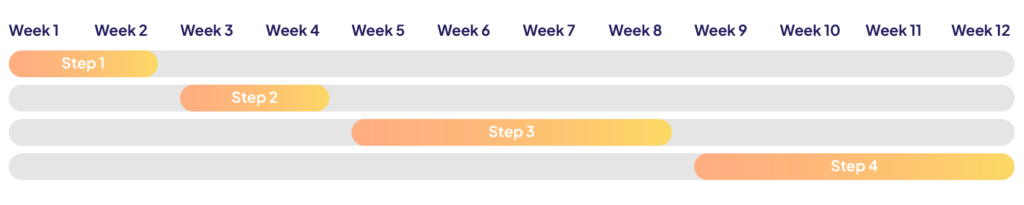
Step 1
Assess your current situation
The first weeks center around understanding your school’s starting point. The team will review your current processes to identify your unique pain points – such as disorganized invoicing, compliance risks, or high bill rates.
Step 2
Plan your implementation
With priorities defined, the VMS team will customize your platform. During this phase, the team will help you build out “Position Templates” for the roles you frequently hire for, establishing the required credentials, locations, and rate rules for each. You will also identify key stakeholders (district administrators, finance teams, IT staff) to build early ownership.
Step 3
Launch & train
It’s go time! The VMS team guides you through setup. Vendor data, credentials, and contracts are migrated into the system securely. Staff are trained on how to use the dashboard, and a pilot program is often run to test the workflow before a district-wide rollout.
Step 4
Expand & optimize
After a successful test run, the VMS is fully rolled out. This is a great time to gather feedback and highlight early wins, such as the elimination of paper timesheets or faster candidate submissions.
Step 5
Continuous improvement
Once your VMS is running smoothly, regular check-ins on key performance metrics will deliver powerful data insights. As your school grows, your VMS provider should offer continuous, hands-on support to help you configure new features – because a successful VMS relies just as much on human support as it does on technology.
Note: This timeline reflects a typical implementation for a self-managed VMS. If you choose to hire an MSP to manage your VMS, the implementation process is entirely managed for you, and some steps may be significantly streamlined.
Why go with a VMS
What’s at stake?
School staffing doesn’t have to be an exhausting, manual process. A VMS gives you the technological infrastructure to turn vendor relationships from a time-consuming headache into an automated, efficient, and transparent process. This ensures school staff are freed up to spend their valuable time and energy on strategic priorities, not on administrative paperwork.
The benefits go beyond mere efficiency. A VMS provides real-time data, compliance protection, and stronger operational control. Together, these capabilities help schools stay focused on what matters most: supporting educators and delivering high-quality education to students.

Glossary of Terms
Application Programming Interface (API)
An API is a component of software that allows two applications to communicate with each other. When you use a ridesharing app or send a mobile payment, the unique API of those apps allows the app to connect to the internet and send data to a server. Every software technology has its own unique API. Open APIs, also called public APIs, are readily available to software developers. This allows for easier integrations with
other software.
Artificial Intelligence (AI)
Artificial intelligence is the science of creating machines and technology that can make decisions like humans. AI technology can mimic human problem-solving and decision-making abilities, while also processing large amounts of data in a short amount of time in ways that humans cannot.
Human Capital Management (HCM)
A Human Capital Management system is a set of software that helps a business manage their workforce. An HCM streamlines most human resources (HR) operations, with capabilities often including recruitment, onboarding, hiring, staff compliance,
and more.
Managed Services Provider (MSP)
A Managed Services Provider is a third-party company that remotely manages a customer’s/school’s IT (information technology) infrastructure on a day-to-day basis. An MSP is like an “on-demand” IT team for businesses that do not have the in-house resources to provide this service.
Vendor Management System (VMS)
A Vendor Management System is a software platform that helps businesses manage their relationships with their external vendors and contingent workforce.
Related resources
User experience matters. That’s why clients choose MatterWorx.